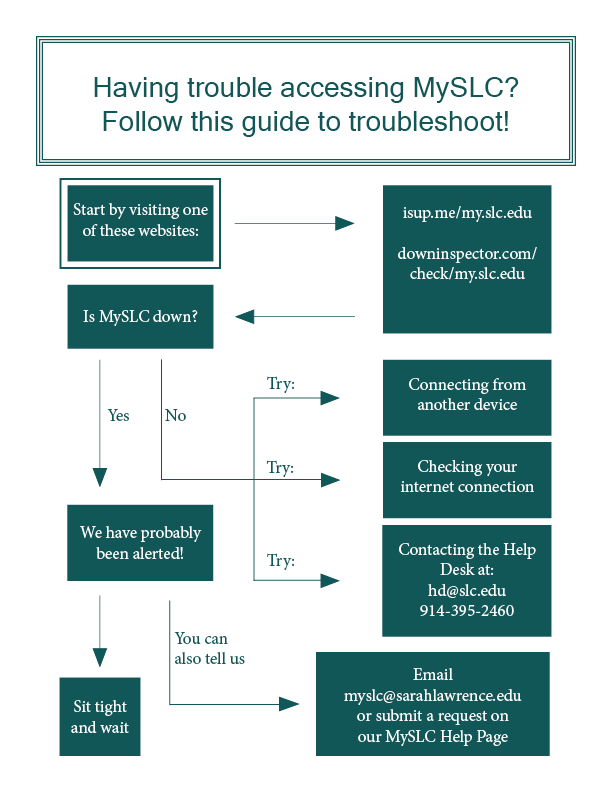
Is MySLC down?
If you think there may be a problem with MySLC, visit:
These services will tell you whether an internet connection issue may be preventing your particular device from connecting to MySLC ("It's just you.") or if the MySLC server is down ("It's not just you!").
If MySLC is up but you cannot connect to it, try loading MySLC on another device or connecting to the internet another way. For further assistance with your internet connection, contact the Help Desk staff at 914-395-2460 or helpdesk@sarahlawrence.edu.
If MySLC is down, we are likely already aware (thanks to our server monitoring software) and working on a fix! However, if you want to let us know or check in about the status, sign in and click "Submit a request" next to your name at the top of the screen or email myslc@sarahlawrence.edu.
Is Calendly down?
If you think there may be a problem with Calendly, visit: https://www.calendlystatus.com/#
This page will show whether Calendly's systems are operational (it will say "Operational" to the right of all systems) or if there is currently an outage (it will say "Major Outage" or "Partial Outage" to the right of one or more systems).
If Calendly is up but not working for you, try clearing your browser’s cache. View instructions on how to do this on Windows and Mac.
If the issue persists, try loading Calendly on another device or connecting to the internet another way. For further assistance with your internet connection, contact the Help Desk staff at 914-395-2460 or helpdesk@sarahlawrence.edu.
If Calendly is down, you can check the status page periodically for updates, including any estimated time for restoration.
If you have any questions regarding Calendly, feel free to reach out to us by signing in and clicking "Submit a request" next to your name at the top of the screen or emailing myslc@sarahlawrence.edu.
Is Zoom down?
If you think there may be a problem with Zoom, visit: www.zoomstatus.com
This page will show whether Zoom's systems are operational (it will say "Operational" to the right of all systems) or if there is currently an outage (it will say "Major Outage" or "Partial Outage" to the right of one or more systems).
If Zoom is up but you cannot connect to it, try clearing your browser’s cache. View instructions on how to do this on Windows and Mac.
If the issue persists, try loading Zoom on another device or connecting to the internet another way. For further assistance with your internet connection, contact the Help Desk staff at 914-395-2460 or helpdesk@sarahlawrence.edu.
If Zoom is down, you can check the status page periodically for updates, including any estimated time for restoration.
If you have any questions regarding Zoom, feel free to reach out to us by signing in and clicking "Submit a request" next to your name at the top of the screen or emailing myslc@sarahlawrence.edu.
Comments